From incident to action in seconds — no error, no delay.
Critical incident, on-site emergency, system outage, on-call team mobilization.
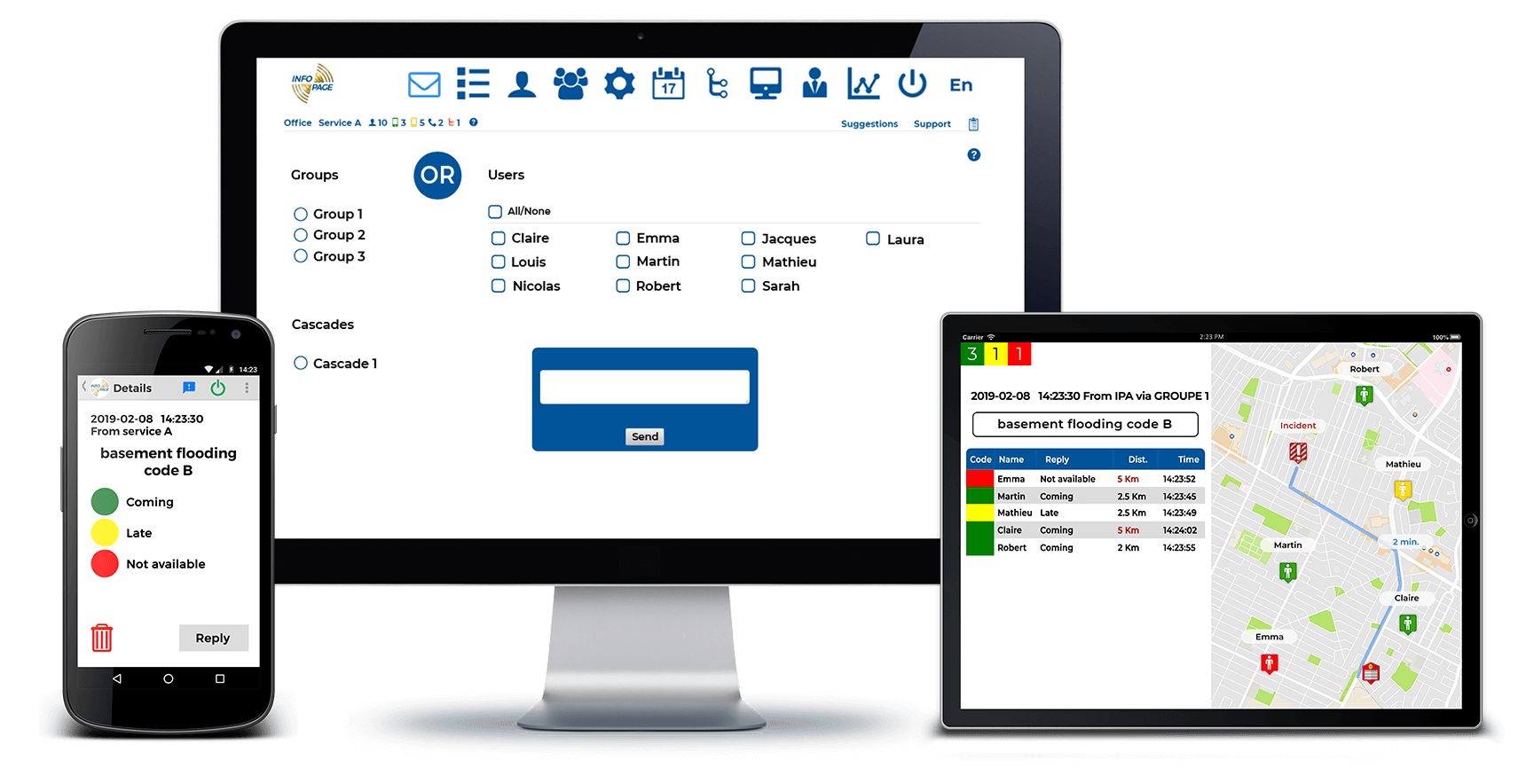
Reception - Transmission - Dispatch
Designed to receive from your alarm, monitoring and dispatch systems. Transmission via SNPP, email, Web API, SMS and phone calls.
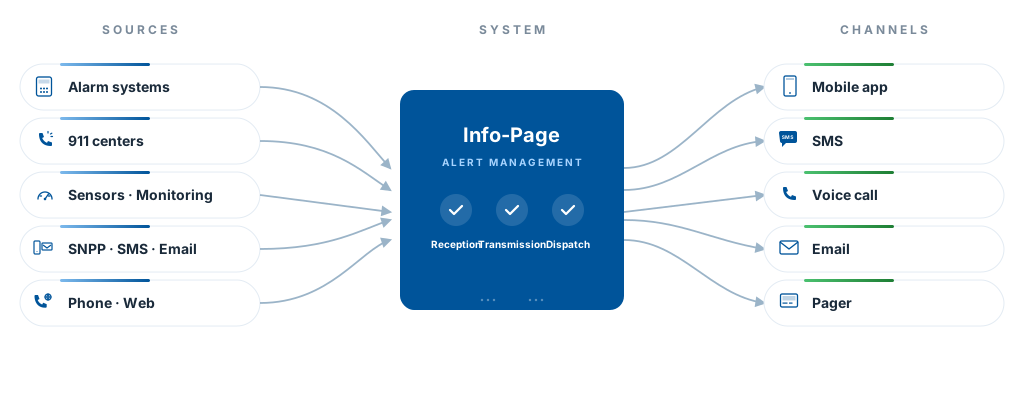
NEVER MISS AN ALERT !
In incidents or emergencies, never miss a single alert, whatever the source (monitoring systems, sensors, 911 centers, via SNPP, SMS, email, phone, directly from the app or a cellphone, etc.)
Get alerts and follow-ups directly on your cellphone !
Depending on your configuration, messages are sent automatically to users, to groups, or trigger cascade alerts.
- Have the certainty of immediate handling thanks to Received. Read. Answered. notifications.
- If your cellphone loses internet connection, a backup SMS is sent automatically.
- Voice-if-unread option — if you do not read or answer in time, a voice robot calls you after 2 minutes, reads the transcribed alert and offers the response choices.
- Call-forwarding option — an incoming call to the group number is picked up by the system with a hold message, then forwarded to the available user's cellphone.
- To guarantee reception under any condition, in addition to the app notifications, enable multi-channel escalation: SMS (GSM), voice call (GSM), email and/or pager.
External actions on alert: webrelays and webhooks
IPA can also trigger actions on external systems at the same instant an alert is distributed to users — not just send messages.
- Webrelays — activate network-connected electric relays to drive field equipment: sirens, strobe lights, station lighting, gas cutoff, automated doors. Heavily used by fire services to automate station activation as soon as the 911 alert is received.
- Outbound webhooks — notify other systems in parallel via HTTP request: third-party dashboards, SIEM, monitoring tools, external CAD, etc.
- API available — integrations can be extended on demand for specific cases (ERP, CMMS, SCADA).
Alert distribution
Reach the right people at the right time: individual users, groups or cascades. Recipients get their alerts via mobile app, SMS or phone call.
Alerts sent to users
In the system, register as many users as you want. Alerts are sent to all or only to those you choose.
Alerts sent to groups — three types to fit your needs
Create as many groups as needed. Only members of the called group receive the alerts. Choose the group type based on where your alerts come from:
Internal group
Reachable only from the Info-Page web or mobile interface.
- Ideal for teams already inside the app
- No telecom cost
- Simplest setup
Group with identifier
Reachable via API, SNPP, email or the internal interface.
- For automated integrations
- Connects to your alarm, monitoring or ERP systems
- Unique identifier provided by Info-Page
Group with dedicated number (DID)
Reachable via API, SNPP, email, SMS and phone calls.
- Maximum coverage — even a phone call can trigger an alert
- Recorded voice message option
- Direct call-forwarding option
For alerts from outside sources (911 centers, monitoring systems, sensors), the group's identifier or number routes to the right team automatically, with no human intervention.
Cascade alerts
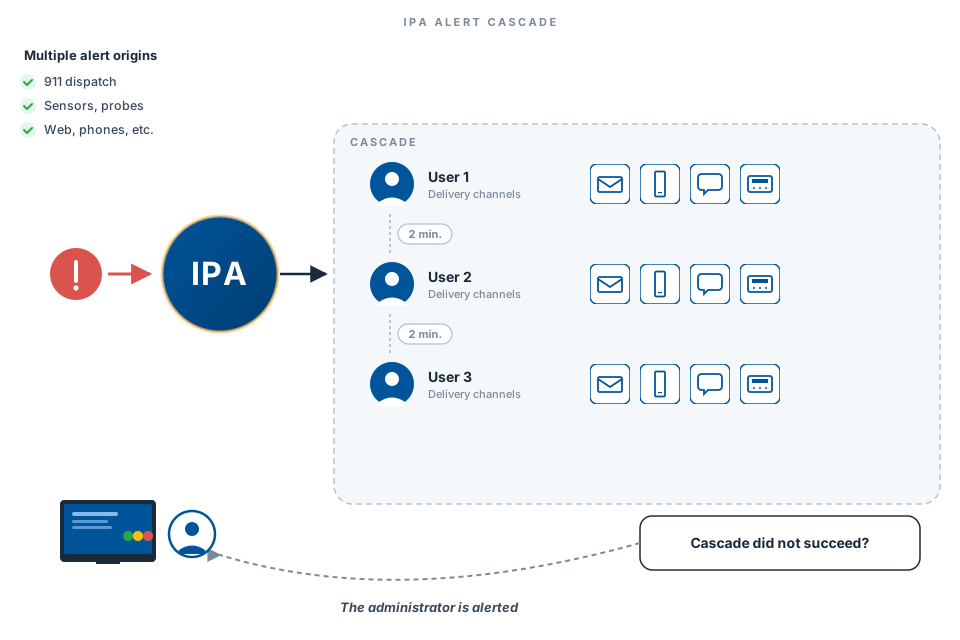
Cascade alerts are sent to several users called one after another. They run until a positive answer is received and the situation is handled.
Create as many as needed. Their flexibility lets the administrator define multiple choices for each, considering or not the calendar, seniority, location, specific skills, etc.
They guarantee the reception of ALL calls !
If a cascade does not complete (no answer or quota not reached), the administrator is automatically notified.
You can also trigger several simple cascade alerts at the same time. For example, you want three cascades you already created to run simultaneously because you absolutely need three specialized people at once. You build a cascade group with these three simple cascades. We give you a dedicated number for that cascade group.
Hospital telephony: operator collaboration
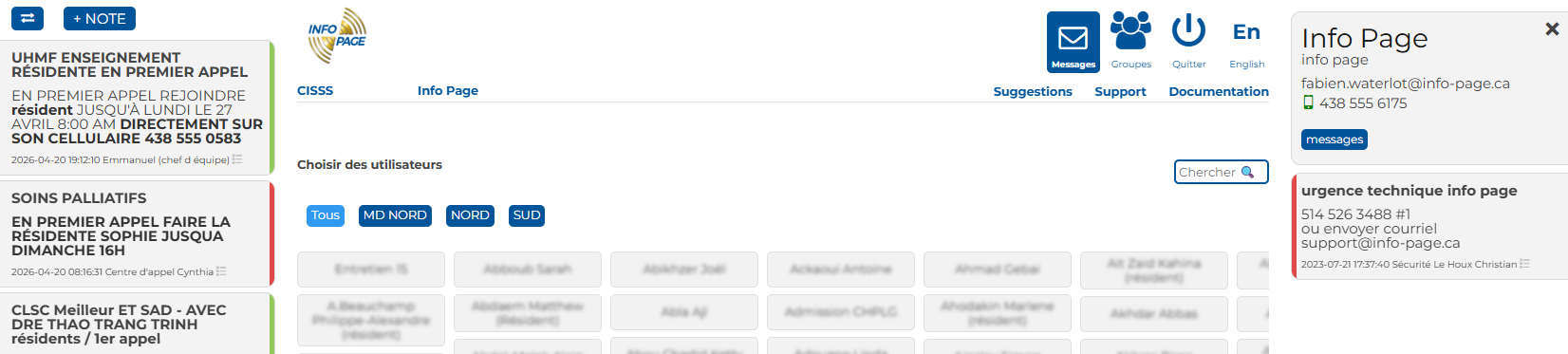
The message-sending screen is built for hospital switchboard operators coordinating all day to reach doctors and on-call staff. Two shared notes streams and a team activity view, integrated into the same screen.
- Agent-to-agent notes (left) — shared context in real time between connected operators.
- Notes about the contacted person (right) — contact preferences, codes and availability specific to each doctor or staff member.
- Team activity — toggle between internal notes and statuses of messages sent by all colleagues.
- Quick editing — +NOTE button to add, pencil icon to edit.
Emergency Measures Plan (PMU)
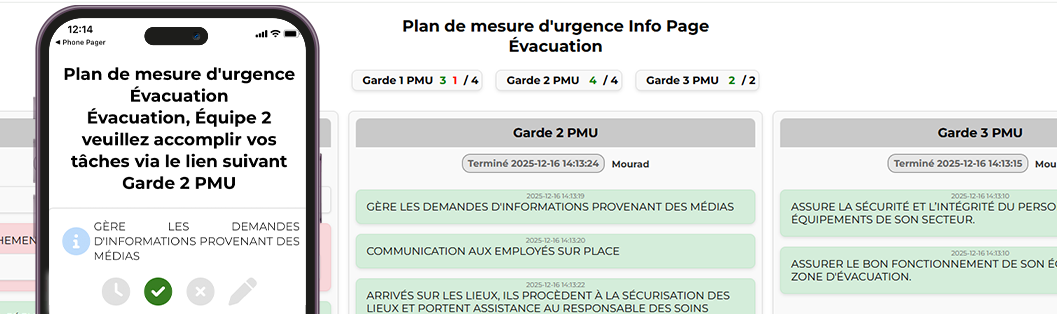
Go beyond the alert: orchestrate the response. Create event types (major outage, fire, code blue, evacuation, etc.), associate the relevant groups and give each an ordered task checklist.
- For responders — three buttons per task: Done, In progress, Cannot complete. Free-text comments on every step.
- For admins — live event dashboard: every group, every task, every status updating in real time.
- Analysis log — full history of status changes, exportable to CSV, for post-incident review and continuous protocol improvement.
Traceability
Follow events live. Know in real time when an alert was received, read, and answered.
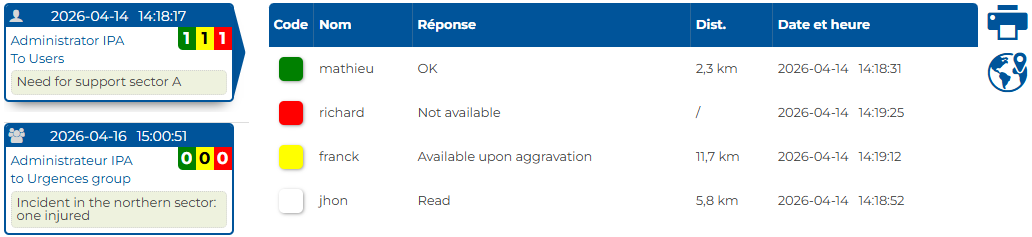
Need to explain how an intervention went with proof ? Our system keeps traces of every alert and every response in memory:
- The date and time of transmission and reception of each notification.
- The exact time of responses and response changes if any.
- Whether phones were on or off.
- Whether users were on-schedule or not.
- The history of channel escalations: SMS, voice call, email read receipt, pager provider handoff.
Response color codes
Each response is classified by color. Labels (pre-configured responses or free-form input) are fully customizable by the client — for example ‘10-16 available’, ‘On the way’ or ‘OK’.
Real-time monitoring screens
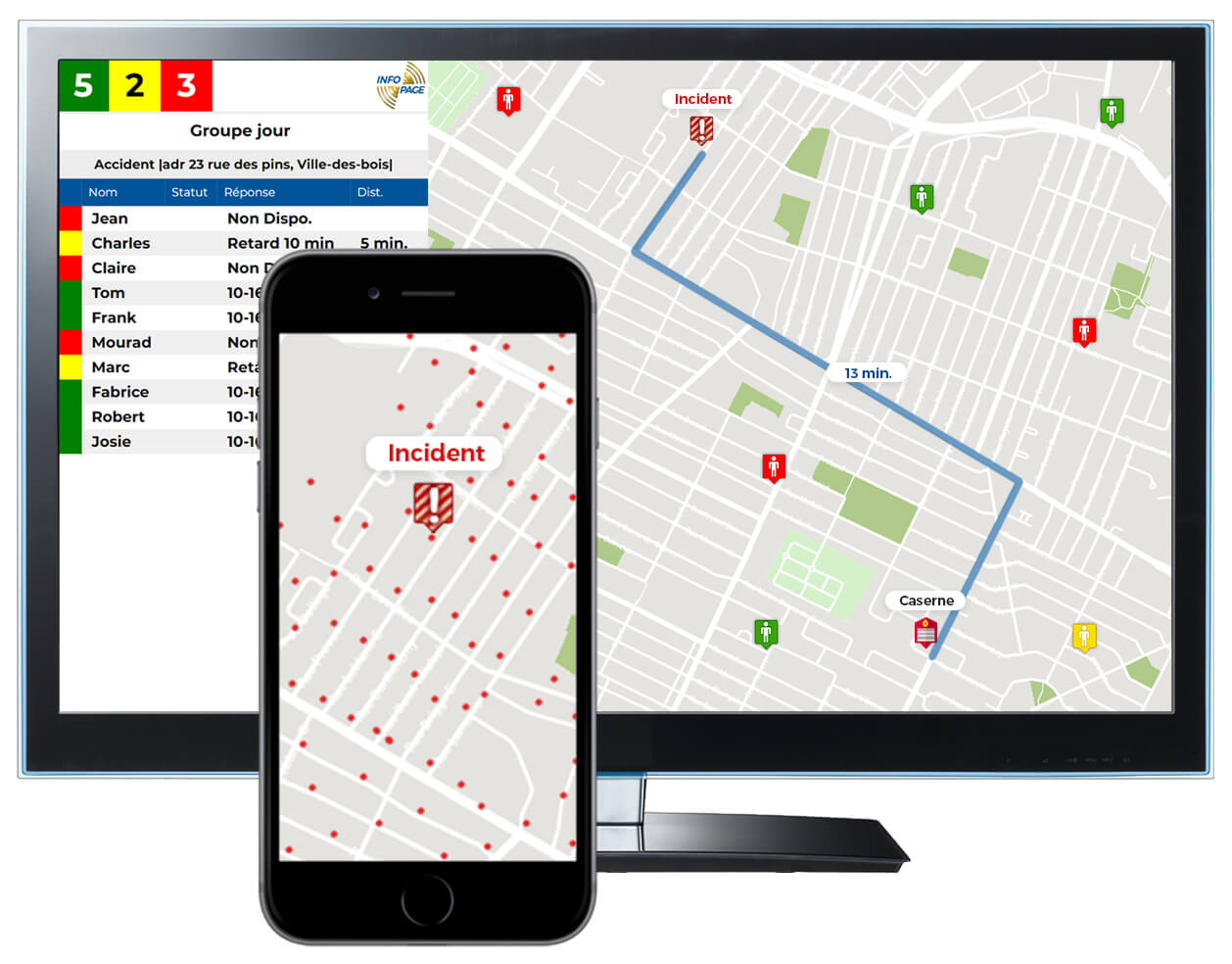
Display IPA activity on a dedicated screen — TV, smart monitor or PC in a command center.
- Live map: intervention location, station, route and estimated travel time
- Responders’ locations at the moment they received the alert
- Live scrolling list of agents’ responses
- History of recent alerts with response summary
- Automatic refresh and auto-scrolling
Configuration: a screen can be associated with one or several groups, or filtered by keywords. Ideal for fire stations, emergency rooms and command centers.
Staff management
PERSONAL calendar for every user and GLOBAL calendar for administrators. See availability live on any device — and go further with on-call scheduling, overtime distribution and self-service group access.
Access to every function is finely controllable: allow, restrict or hide on a case-by-case basis through granular per-user rights.
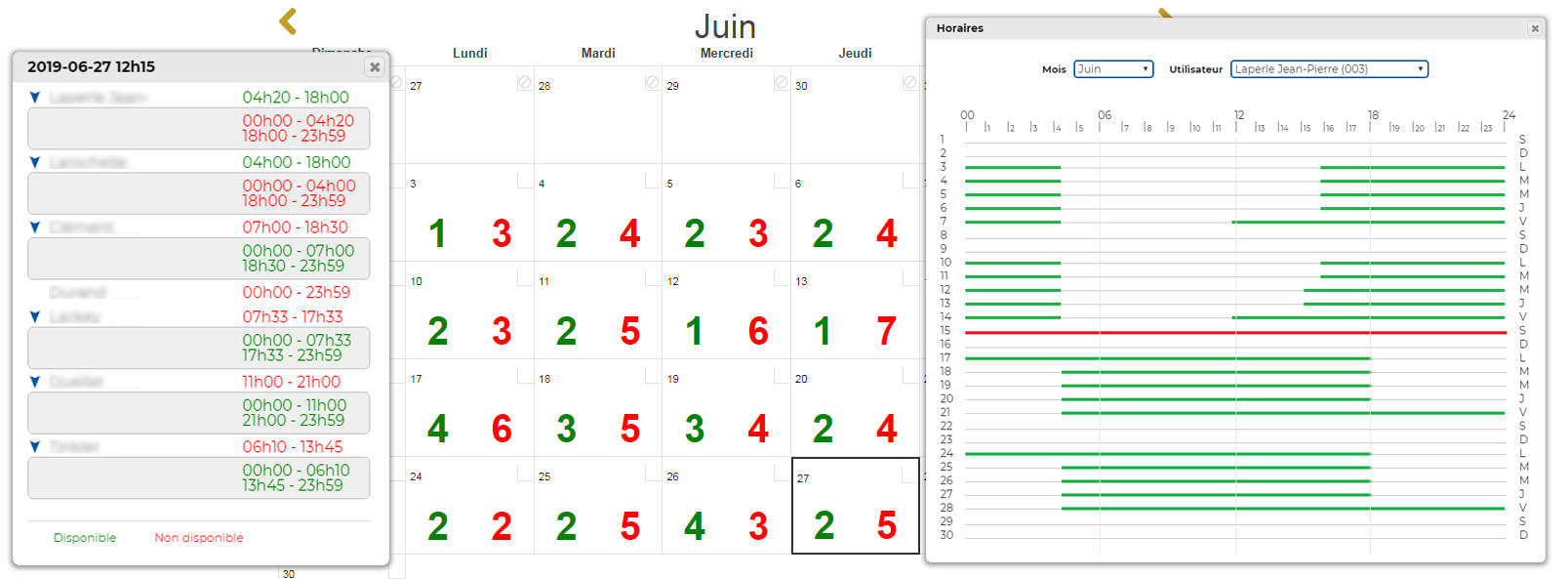
Availability calendar
Each user enters their own schedule directly from their phone or the web interface. Administrators see in real time who is available and when.
- Save time !
- Plan your team's schedules with ease !
- Reach the right people based on their availability or seniority.
Advanced features
Three tools to precisely orchestrate who receives what, and when:
On-call scheduling by time blocks
A rotation calendar divided into X-hour blocks, with the right team assigned to each block.
- Assign each block to users, groups, cascades — or a mix
- When an alert arrives, the system routes to the active on-call team first
- If nothing is scheduled, automatic fallback to the regular group
Fair overtime distribution
Assign extra shifts transparently based on seniority and accumulated hour banks.
- Post an offer: number of spots, hour bank, mission date, deadline
- Users available in the calendar receive the alert
- On the deadline, automatic assignment to the most senior with the fewest hours banked
Self-service group access
Let your users join and leave the groups you have chosen to make available to them.
- Admins choose which groups are visible, and to whom
- In the app: green = I'm in, white = I'm not
- One tap to join or leave — ideal for optional or temporary teams
Rich in features. Never at the expense of simplicity.
IPA handles demanding scenarios — 911 centers, hospital switchboards, complex on-call rotations — yet every function can be enabled, hidden or tuned case by case. Your users only see what they need.
Lean by default
Start with the essentials and add as you go.
Deep when needed
Turn on advanced functions (on-call, overtime, screens, hospital telephony) when you need them.
You stay in control
Granular per-user rights, per-group visibility, full customization.
Try Info-Page Alerts free for 1 month
No commitment. Set up your system in minutes.
free trial without commitment