Slack, Teams, email: critical alerts blend with conversations, memes and failed-build notifications. When it pings, impossible to tell whether it is urgent.
IT and IT support
No more alerts lost in the noise
IPA acts as an intelligent distribution layer between your monitoring tools (Zabbix, Datadog, Nagios, SOC) and your technicians. Dedicated app with distinctive ringtone, automatic cascade, self-service on-call calendars — each alert reaches the right person, at the right time, with guaranteed handling.
Sector challenges
Our answer
Dedicated app, distinctive ringtone
When IPA rings, it is critical. Custom ringtone of choice, overrides silent and Do Not Disturb, visible on the lock screen. No more confusion with Slack buzzing every 5 minutes for nothing.
On-call schedules on Google Calendar, Excel, Slack — every team with its own system. Last-minute swaps lost in messages. No one knows exactly who is on at 3am.
Self-service calendars and on-call
Each technician manages their calendar from the app: group memberships, availability periods, ON/OFF switch for temporary unavailability. Admin sees everything live, one-click substitutions.
Dozens of alerts per day from monitoring, cloud, SOC. In the flood, real emergencies get lost and teams end up ignoring notifications — then the real outage drowns in the noise.
Intelligent distribution, no noise
IPA routes each alert to the right group (support, network, infra, cybersecurity) based on type, time, active on-call. The technician only receives what concerns them. No more generic alert streams to sift through.
An alert goes out by email. Was it seen? By whom? When? If no one answers, who takes over? Often you find out the next day the outage lasted 2 hours without intervention.
Received / Read / Answered status + cascade
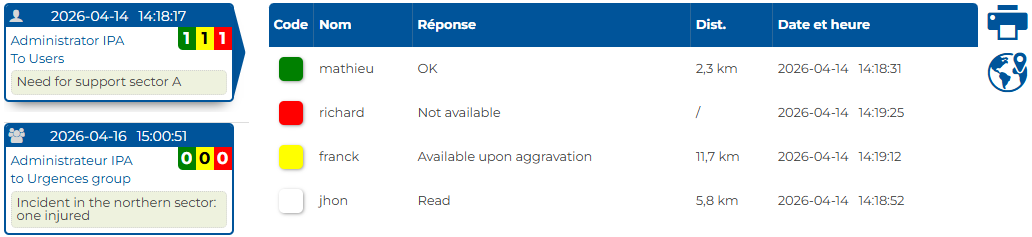
Every alert reports its status in real time. If the on-call technician does not answer within the set delay, automatic cascade to the next person, then to another group, and as a last resort to the administrator. No critical alert goes unanswered.
Zabbix, Nagios, Datadog, PRTG, CloudWatch, SOC probes: each alerts differently. How do you unify without re-wiring everything?
Universal email and webhook
Each IPA group has its dedicated email and webhook. Point your existing tools (Zabbix, Datadog, SOC) at them without changing your stack. No migration, no heavy integration: works in 10 minutes.
Outage or intrusion at 3 am, the right technician
within seconds
-
Detection
Your monitoring (Zabbix) or SOC detects the incident at 3:12am. Email or webhook sent to the relevant group (Infrastructure, Cybersecurity).
-
Smart routing
IPA identifies the active on-call team (calendar up to date), routes the alert to the technician on duty. Dedicated ringtone notification, overrides silent and DND.
-
Acknowledgment
Technician confirms with one tap from the notification: « On it ». Status updates the dashboard. They open the VPN and fix the issue.
-
Cascade on silence
No answer in 3 minutes? Auto cascade to the backup, then to the whole team. If no one confirms, the administrator is alerted as a last resort. Logged for the post-mortem.
Webhook, API, integrations — inbound, outbound, custom
IPA integrates both ways along your tool chain. Exactly what you need, nothing more.
Inbound webhook
Dedicated URL per group. Receive alerts from Zabbix, Datadog, SOC probes, cron scripts, in-house apps.
Outbound webhook
IPA notifies your external systems (Jira, ServiceNow, Slack, Teams, scripts) at each status: acknowledged, escalated, closed.
Dedicated email
For tools that alert by email (SCADA, basic probes, cron). Treated exactly like a webhook.
Custom integrations
Got a unique in-house system? Our team works with you to build the right integration.
A specific integration case?
Got a business tool, in-house software, a proprietary probe? Tell us your need, inbound or outbound — our team builds the integration with you.
One alert, one tap, one response
The app supports every IT role — technician, team lead, admin — from notification to incident resolution:
- Alarm that cuts through. Dedicated ringtone of choice, strong vibration, overrides silent and Do Not Disturb. SMS and voice call backup if the app does not respond.
- Acknowledge with one tap. From the notification: « On it » / « In progress » / « Unavailable ». No need to open the app or log in.
- Live incident tracking. Team status in real time, who is handling what, automatic escalations. The admin can trigger an alert from their app, without going through the console.
- Personal management. My IT groups (network, infra, cybersecurity), on-call calendar, ON/OFF switch for leave or training.
- Role-based access rights. Technician, team lead, IT admin, supervisor — each user sees and does what their role allows.
Cuts-through alarm
Even on silent / DND
- Dedicated ringtone
- Overrides silent + DND
- SMS & voice backup
Ack in 1 tap
From the notification
- On it / In progress / Unavailable
- No need to open the app
- No login required
Live incident tracking
Pocket dashboard
- Team status live
- Who is handling what
- Full history
My settings
From your phone
- My IT groups
- On-call calendar
- ON / OFF switch
Role-based access rights
technician · team lead · IT admin · supervisor
< 30 s
from incident detection to notifying the active on-call technician — automatic cascade if no response
IPA features activated in this sector
Frequently asked questions
Which monitoring tools are compatible?
Any tool that can send email or make an HTTP call: Zabbix, Nagios, Datadog, PRTG, AWS CloudWatch, Azure Monitor, Google Ops, SOC probes, SIEM. Each IPA group has its dedicated email and webhook — you point, it works.
How long to integrate?
Account created in minutes. First groups and calendars set up in 30 minutes. Integrating a monitoring tool (add the dedicated email to its config): seconds per tool. You can start redirecting your critical alerts today.
Automatic cascade: what parameters?
You configure the delay (e.g. 3 min no answer → cascade), the number of people paged in parallel, the escalation order (technician → backup → group → another group), and rules per incident type. If the cascade exhausts all levels without a response, the administrator is alerted automatically. Fully configurable, no code required.
App on personal or corporate smartphones?
Both work. The app is free (iOS/Android), installs in 30 seconds. Each user controls their own settings (ringtone, vibration, ON/OFF). No MDM required, no intrusive central configuration.
How does pricing work?
Per-enrolled-user pricing, from $4 / user / month. Free app on your technicians' phones. No per-device contract, no hardware. No-commitment trial.
Cybersecurity: is our data protected?
Servers located in Quebec, compliant with Quebec's Bill 25. TLS-encrypted communications. IPA only stores the alert messages (not the full payload of your monitoring emails). Complete, exportable audit trail.
Your tools already send emails — not keen on coding an integration?
Just point your tools' alert emails to a dedicated IPA address. We convert each email into a critical SMS, voice or push alert to the right on-call technician, with automatic cascade and acknowledgment. No API integration to code, no webhook to configure — native email-to-SMS and email-to-voice gateway. Works with anything that can send an email: Zabbix, Nagios, Datadog, PRTG, AWS CloudWatch, Azure Monitor, SOC probes, SIEM, or just a script that fires a mail.
365 × 24/7 support — infrastructure in Quebec
The solidity a critical infrastructure demands.
24/7 human support
Our team is reachable at all times. No bot, no lost ticket — engineers who know your deployment.
Hosting in Quebec
Servers located in Quebec, compliant with Quebec's Bill 25. Your data stays on Canadian soil.
Redundant infrastructure
Redundant servers, encrypted backups, 24/7 monitoring. Availability is our foremost commitment.
Try IPA with your IT team — no commitment
Full account created in minutes. Groups setup and monitoring integration done in hours. Unlimited trial — you will not go back to alerts lost in the noise.